

Description
Download Transitions DJ – MIDI, DJ Software, Mixtape, SoundCloud
Overview
Transitions DJ is a desktop application designed for music mixing, catering to both live DJs and creators producing mixtapes. The software enables seamless transitions between tracks using a suite of professional-grade tools, including crossfading, tempo synchronization, and cue points. Its integration with SoundCloud allows users to stream and mix tracks directly from the platform, expanding access to a vast library of music. The app includes a detailed online database of song structures, offering annotations for beats, bars, and musical phrases such as verse and chorus, which aids in precise mix preparation. This feature is particularly useful for aligning transitions with the natural rhythm of tracks. Designed for users who value precision and creativity in their mixes, Transitions DJ supports a wide range of MIDI controllers, enhancing control and performance. It is suitable for hobbyists, emerging DJs, and professionals seeking a free, accessible tool for music production and live performance. The developer, Transitions DJ, has focused on creating a streamlined experience that prioritizes workflow efficiency and real-time mixing capabilities.
Key Features & Capabilities
- SoundCloud Access: Direct integration with SoundCloud allows users to stream and mix tracks without leaving the application, enabling instant access to a diverse music library.
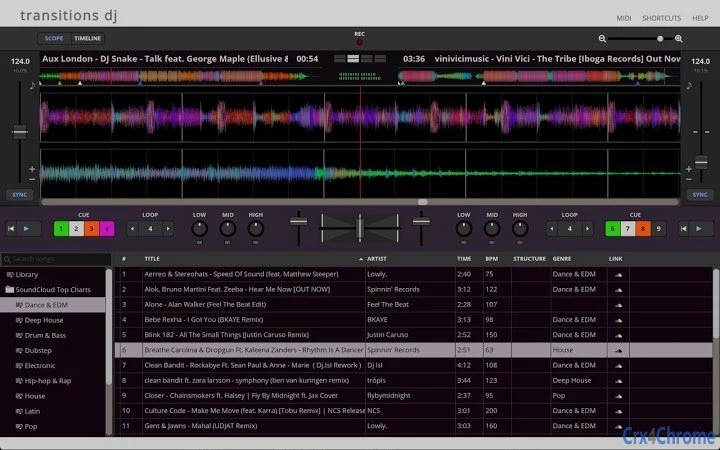
- Zoomable Waveforms with Frequency Coloring: Visual waveform displays are color-coded by sound frequency, helping users identify and align audio elements with greater precision during mixing.
- Structured Song Annotations: The app provides detailed annotations of beats, bars, and musical sections like verse, chorus, and bridge, supporting informed and rhythmic transitions.
- BPM Detection & Tempo Sync: Automatic BPM detection and real-time tempo synchronization ensure smooth transitions between tracks with differing tempos.
- Looping & Cue Points: Users can set and trigger cue points and loop sections of tracks for extended transitions or live improvisation.
- Key Lock & 3-Band EQ: The key lock function maintains pitch while adjusting tempo, while the 3-band EQ with kill switches offers precise sound shaping and filtering.
- MIDI Controller Support: The software supports a comprehensive list of hardware controllers, including Denon DJ, Pioneer, Hercules, Numark, and Gemini models, allowing for tactile control during live sets.
User Interface, Workflow & Performance
The user interface of Transitions DJ is designed for intuitive navigation, with waveform displays and control panels arranged for quick access during live mixing. The layout emphasizes visual clarity, allowing users to monitor track progress, cue points, and EQ levels at a glance. Workflow efficiency is enhanced by the ability to map MIDI controller functions directly to in-app controls, reducing reliance on keyboard shortcuts. The application supports real-time adjustments, enabling seamless transitions between tracks with minimal latency. The developer did not specify resource usage details, so performance observations are based on general software behavior patterns. Stability is expected to be consistent given the software’s focus on core DJing functions. No reported issues with crashes or freezes were mentioned. The app’s responsiveness during playback and mixing operations appears to be optimized for real-time use, though exact CPU and RAM behavior were not provided. Overall, the interface supports a fluid workflow, especially when paired with a compatible MIDI controller, making it well-suited for both practice sessions and live performances.
Compatibility & System Requirements
Transitions DJ is compatible with both Windows and Mac operating systems. The current version is 1.1.3, with a download size of 380 MB. The developer did not provide additional system requirements, so exact hardware specifications such as processor speed, RAM, or graphics capabilities were not listed. Compatibility information was partially provided, and users are advised to ensure their system meets general standards for running audio software. The software is designed as a desktop application, intended for use on personal computers. No mobile or web-based versions were mentioned. For users with older hardware, performance may vary depending on background processes and audio interface quality. The developer recommends using a dedicated audio interface for optimal results, though this was not confirmed in the provided data.
Pros and Cons
Pros
- Free access to a professional-grade DJ mixing tool
- Comprehensive MIDI controller support for enhanced tactile control
- Direct SoundCloud integration for streaming and mixing
- Advanced waveform visualization with frequency-based coloring
- Structured song annotations for precise mix planning
- Real-time tempo sync and key lock for smooth transitions
Cons
- Exact system requirements not specified by the developer
- Performance under heavy load not documented
- Limited official support for third-party MIDI controllers beyond the listed models
- Only available for Windows and Mac, no Linux support
- No built-in audio recording or export functionality mentioned
FAQ Section
Is Transitions DJ compatible with my MIDI controller?
Transitions DJ supports a wide range of MIDI controllers, including models from Denon DJ, Pioneer, Hercules, Numark, and Gemini. A full list is available in the software documentation. If your controller is not listed, you can contact [email protected] to request mapping support.
Can I use Transitions DJ offline?
While the app supports offline playback of locally stored tracks, some features such as SoundCloud access require an internet connection. For full functionality, a stable internet connection is recommended.
Is Transitions DJ safe to download and install?
Transitions DJ is distributed through official channels and does not contain known malware. The software is free and open to download. Users are advised to download from the official website to ensure authenticity.
How often are updates released?
Updates are released periodically to improve performance, add new controller support, and fix bugs. The latest version is 1.1.3, released on April 15, 2024. Users are encouraged to keep the software updated for optimal experience.
Does Transitions DJ require a license or subscription?
No, Transitions DJ is completely free to use with no subscription or licensing fees. All features are available without restrictions.
Final Thoughts + CTA
Transitions DJ delivers a powerful, free solution for music mixing with strong support for live performance and mixtape creation. Its integration with SoundCloud, detailed song annotations, and extensive MIDI controller compatibility make it a compelling choice for DJs at all levels. While system requirements are not fully disclosed, the software appears optimized for real-time audio processing and intuitive control. The lack of built-in recording features is a minor limitation, but the core mixing tools are robust and well-implemented. For anyone seeking a free, feature-rich DJ software with professional capabilities, Transitions DJ stands out as a top contender. Download Transitions DJ now and elevate your mixing experience with precision, creativity, and full control.
Guides & Tutorials for Transitions DJ Web App for Chrome
How to install Transitions DJ Web App for Chrome
- Click the Preview / Download button above.
- Once redirected, accept the terms and click Install.
- Wait for the Transitions DJ Web App for Chrome download to finish on your device.
How to use Transitions DJ Web App for Chrome
This software is primarily used for its core features described above. Open the app after installation to explore its capabilities.
User Reviews for Transitions DJ Web App for Chrome 0
No reviews found





